




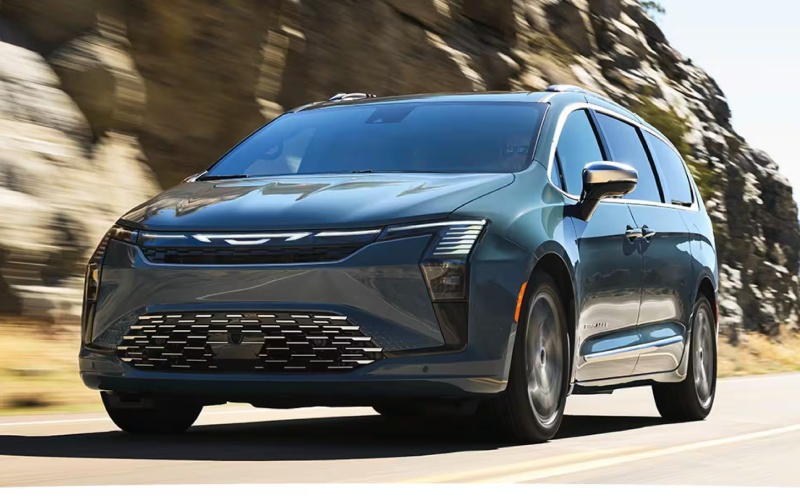
David Taylor CDJR of Mayfield - How does the 2027 Chrysler Pacifica FamCAM™ help keep an eye on the third row around Murray, KY?
Families who want a clear view of every seat often wonder how an interior camera actually performs in daily driving. FamCAM™ on the 2027 Chrysler Pacifica gives you exactly that reassurance, showing a live view of the second and third rows right on the main touchscreen so you can check in without turning around or taking your eyes off the road for long. For parents navigating school pickup near Murray, KY, or shuttling to practices across the KY 80 and KY 121 corridors, this simple feature eases stress and adds a layer of calm to every commute.
What makes FamCAM™ especially helpful is how naturally it fits into the Pacifica’s ecosystem. The view appears on the Uconnect® 5 10.1-inch display, which means you aren’t juggling different screens or apps while you drive. Whether you’re confirming that seatbelts are secure, settling a sibling debate, or peeking at a rear-facing child seat, it’s all accomplished with a glance that keeps your focus forward.
What FamCAM™ Shows and Why It Matters
FamCAM™ is designed to give the driver a convenient, wide-angle perspective of the second and third rows. The image is clear, bright, and easy to read, even during quick checks at stoplights or when easing through a parking lot. Think of it as a smart complement to the Pacifica’s thoughtful cabin, where the segment-exclusive Stow ’n Go® seating and available Stow ’n Vac® vacuum already make organization and cleanup simple.
Visibility is a safety story, too. While FamCAM™ helps you see inside the vehicle, the 2027 Pacifica also offers Turn Signal-Activated Blind Spot View and ParkSense® Based Camera Activation as part of the upgraded Safety Sphere package. Together, these features enhance your view where it matters most—around the vehicle and within it—so routines around Murray feel more relaxed.
Everyday Scenarios Where FamCAM™ Shines
Real life with kids rarely looks like a photo shoot. Sports bags slide, toddlers nod off, and water bottles disappear into seat crevices. FamCAM™ helps you navigate those moments with less stress and fewer shoulder checks.
- Check for naps before you hit a drive-thru
- Confirm a third-row buckle after a quick stop
- See who needs a snack without pulling over
- Monitor a rear-facing child seat with a screen glance
- Ensure backpacks or instruments stay upright on bumpy roads
Because the view appears on the main display, it’s easy to engage during a pause and then return to your map, audio, or vehicle settings without losing time.
How It Works With Uconnect® 5
The Uconnect® 5 system on the Pacifica’s 10.1-inch touchscreen is your tech hub. It’s quick to respond, cleanly laid out, and built for families who move fast. FamCAM™ integrates seamlessly, so if you’re using available navigation or adjusting audio, it feels like one cohesive experience. If you opt for the available Theater Group, dual rear-seat 10-inch HD touchscreens with Amazon Fire TV built in can keep passengers entertained while you keep the driver’s environment clear and focused.
Parents often ask if the camera compromises the front-row experience. The short answer is no—the system is designed to give you quick access when you need it and to step out of the way when you don’t. It’s a just-right balance of convenience and control.
Test-Driving FamCAM™ Around Town
To get a real sense of FamCAM™, bring your family on the test drive and set up the cabin exactly as you would on a busy afternoon. Stow and raise seats using Stow ’n Go®, load a couple of backpacks or a folding chair, and then toggle the camera on the Uconnect® screen while parked. From there, take a short loop with a few stops. You’ll quickly understand how effortlessly the feature fits your routine.
Ask your product specialist to demonstrate how FamCAM™ works alongside the upgraded Safety Sphere. Seeing Turn Signal-Activated Blind Spot View and ParkSense® Based Camera Activation in action is a helpful way to understand how the Pacifica enhances visibility inside and out.
Frequently Asked Questions:
Can the driver view FamCAM™ while the vehicle is moving?
FamCAM™ is designed for quick, glanceable checks on the main display. Ask your specialist to show you the operation and any use limitations, so you know how to use it safely and appropriately on the road.
Is FamCAM™ helpful with rear-facing child seats?
Yes. One of its best real-world uses is getting a quick look at a rear-facing seat, which is otherwise hard to see from the driver’s position. Many parents find this reduces stress during daily commutes.
Does FamCAM™ record video?
FamCAM™ is a live interior view tool, not a DVR. It’s meant to help you observe the back rows when needed and then return to your primary driving view.
How does FamCAM™ interact with other tech like Uconnect® 5 or the Theater Group?
FamCAM™ displays on the same Uconnect® 5 10.1-inch touchscreen that controls your apps and entertainment. If you add the available Theater Group, rear passengers can enjoy separate content on their screens while the driver uses the main display for primary functions.
Families from across the area rely on smart features to streamline packed schedules, and this is where the Pacifica lineup stands out. With Stow ’n Go® for fast cabin reconfigurations, a clean and intuitive Uconnect® 5 interface, and visibility enhancements inside and out, it feels purpose-built for busy days that don’t slow down.
When you are ready to see how this system fits your world, plan a visit with David Taylor CDJR of Mayfield, serving Murray, Benton, and Wingo. Bring the kids, load a stroller or instrument case, and ask us to walk you through FamCAM™ alongside the upgraded Safety Sphere tools. A hands-on demo will show you why these thoughtful features make such a meaningful difference in daily driving.